Showing posts with label Hadoop. Show all posts

Thursday, March 10, 2016

The Refined and Optimized Data Architecture for Enterprise Needs

We all are by now familiar with the hype of fancy terms like "Big Data", "Hadoop", "No SQL Databases" , but having said that there is one principle behind all that technology expenses when we take a look at this from the enterprise perspective and this is "How much Value is added into the Enterprise".

Believe it or not at the end of the day  I.T services are a supporting platform to benefit business users and stake holders to achieve business goals and forecast the future projections. The main points can be short listed to following

Cost : EDW Typical Storage (usually any MPP architecture solution e.g. Teradata , Netteza , Oracle Exadata etc ) is quite an expensive one and also has a constraint when it comes to keep historical data or unstructured data /sensor data , there is an alternate and that is to store the "Cold" storage data into cheap commodity hardware e.g. Hadoop

Value of return on investment :  Replacing all EDW infrastructure and legacy system with new architecture and technologies is quite an expensive idea however looking at long term prospects and return of investment the best approach is slowly to resolve the limitation of existing EDW infrastructure and make a hybrid architecture to get the maximum value out of it.

Solution Linear Scale-ability and long term solution design :  No doubt , long term solution design and a flexible architecture to handle the growing data and type of data ( social media , sensor , click stream data) is a challenge so data architecture is to be refined to keep long term prospects in mind.

Below is a somewhat close hybrid solution design of a new data architecture for an enterprize.


Above is a reference from a white paper published by Hadoop only one argument which is my personal opinion is that with shifting all ETL to the Hadoop. Instead i believe we should keep it hybrid ( at least for some time to run a parallel architecture) and Keep ONLY Non structured data feeds /sensor/click stream detailed data ETL work on Hadoop platform and let the traditional sources be running into the existing infrastructure.

Reference  : http://info.hortonworks.com/rs/549-QAL-086/images/hortonworks-data-architecture-optimization.pdf?mkt_tok=3RkMMJWWfF9wsRonvKTKc%2B%2FhmjTEU5z16uQsWaeygYkz2EFye%2BLIHETpodcMTcVnMLDYDBceEJhqyQJxPr3AKNkNy9RxRhHqDg%3D%3D



Tuesday, December 30, 2014

Basics : ETL/ELT Concepts with Big Data


Big Data and Hadoop analytics has been a big buzz in IT industry and often you find some catchy terms associated with it. But if we take a closer look I think it would not be wrong to conclude that Big Data community has derived some terms which have the roots in traditional data warehousing or ETL implementation and are there from decades. 

We have observed that over the period of time ETL/ELT is evolving to support integration across much more than traditional data warehouses. ETL can support integration across transactional systems, operational data stores, BI platforms, MDM hubs, the cloud, and Hadoop platforms.

Below are some terms you will see when it comes to data processing with any Hadoop platform and they are listed below with corresponding concept in traditional data warehousing.

Tuple:  This term is used to define the basic information record that can be mapped to one row in the physical table in RDBMS or a record in a file.

Pipe Assembly: It is defined as SET of records which are under processing, you can imagine them as group of rows from a table or a file.

Tuple Stream:  It is actually the group of records which are under any kind of data processing and transformation, usually in any ETL tool the source data is selected and it will undergo some processing or transformation and this operation take place either in system memory or in case of a push down optimization it is done in RDMS spool space. Regardless where the transformation is applied it’s basically the set of records under processing.

Taps : Generic component independent of a platform , it can be mapped to something similar to a transformation step/stage e.g. a router or filter transformation in Informatica or Data stage ( any other ETL tool).

Flow: It is the series of Taps or transformation stages that are linked together to read, process and store some value into the target.

Cascade: Finally the term because of which I had to go through a lot of tutorials to drill down the science behind, this is a traditional concept for workflow it is defined as a collection of flow or in traditional ETL paradigm ETL Mapping Job to execute in a designed way to produce or achieve some value.

Hope that will help all people who are from DWH/BI background to get a grip quickly over the concepts related to ETL in Big Data domain.

References:

Sunday, September 1, 2013

Data Processing with Pig : Understanding PIG functions


In this tutorial we would try to explore some functions for data processing and learn them by example. We would be using PIG script to find out the Maximum runs scored by a player from a baseball stat data. You can download the sample file from http://seanlahman.com/files/database/lahman591-csv.zip.

It’s a collection of files having information about baseball stats while if you unzip this you would have number of files we will be using “Batting.csv”  in this tutorial.
Prerequisite: To understand this tutorial you should have a basic knowledge about PIG and loading file into H-Catalog. Please visit below URL for more details

Steps:

1.       Logon to Hadoop console and Click on “PIG” Icon and Click “New Script”.
2.       Write down the code below in the editing area
a)      batting = load 'Batting.csv' using PigStorage(','); 
b)      runs = FOREACH batting GENERATE $0 as playerID, $1 as year , $8 as runs; 
c)       grp_data = GROUP runs by (year); 
d)      max_runs = FOREACH grp_data GENERATE group as grp , MAX(runs.runs) as max_runs;
e)      join_max_run = JOIN max_runs by ($0, max_runs), runs by (year,runs);
f)       join_data = FOREACH join_max_run GENERATE $0 as year, $2 as playerID, $1 as runs;
g)      dump join_data;
3.       Click on “Save”.
Now let’s try to understand code line by line and keep in mind what we want to do is to find out the Max score done by a player in any year.
batting = load 'Batting.csv' using PigStorage(',');   
This is pretty simple we just want to load one file using PigStorage() function it will load the file structure into “batting” variable ( an array actually).
runs = FOREACH batting GENERATE $0 as playerID, $1 as year , $8 as runs; 
Now here we just want to extract those columns which are useful for us into a separate array you can see that data is accessed based on the $index as first index in Batting.csv contain PlayerId ( name) and 8th index contains the score done by player.
grp_data = GROUP runs by (year); 
GROUP function only groups data into chunks based on the column we specify in our case the data groups will be created based on YEAR which means all records that belongs to one year will be stored together in ONE ROW. If you want to understand it better execute below in PIG editir area
DESCRIBE grp_data;   // Results of this statement is below
grp_data: {group: bytearray,runs: {(playerID: bytearray,year: bytearray,runs: bytearray)}}
This is how GROUP looks like and if you look at that 'group' is the name of first column by default n will contain the "year" value as defined in GROUP BY clause.
The second column is an Object which means you will have records which falls in this group. e.g in this year.
max_runs = FOREACH grp_data GENERATE group as grp , MAX(runs.runs) as max_runs;
Now for each year it will calculate the MAX runs scored.
join_max_run = JOIN max_runs by ($0, max_runs), runs by (year,runs);
JOIN works in similar fashion as it does in SQL it is joining the $0 (Year) and max runs ( line d)  with Year and Runs with “runs” ( line b in code) array. 

In SQL terms the join is as follow
Max_runs inner join
Runs on  Max_runs.Year = runs.year
And Max_runs.max_runs = runs.runs;

join_data = FOREACH join_max_run GENERATE $0 as year, $2 as playerID, $1 as runs;
This last statement just generate a new final dataset by extracting Year , Player Name and MAX runs scored from the joined data set.
The final output of this program is as follows
(1871,barnero01,66.0)
(1872,eggleda01,94.0)
(1873,barnero01,125.0)
(1874,mcveyca01,91.0)
(1875,barnero01,115.0)
(1876,barnero01,126.0)
…
…

Thanks
 

Thursday, August 22, 2013

Hadoop : Getting Started with PIG

In this tutorial lets get started to learn some basics about PIG. If you recall from previous tutorial PIG is a script based utility to write transformations e.g Agg , Join etc similar to SQL it is for people who are more comfortable in SQL then Java. But you can also make UDF for complex transformation which are written in Java and called directly in PIG.

If you are new to Hadoop please go through http://tahir-aziz.blogspot.com/2013/07/introduction-to-big-data-and-hadoop.html

Our current case study which we want to implement is a very simple example we want to compuet the average Stock Volume for IBM company .From last tutrial we loaded the Stock exchange data and we would use the same to complete this.

Refer to the blog to http://tahir-aziz.blogspot.com/2013/08/getting-started-with-hadooploading-data.html

To write our first PIG script follow below steps.

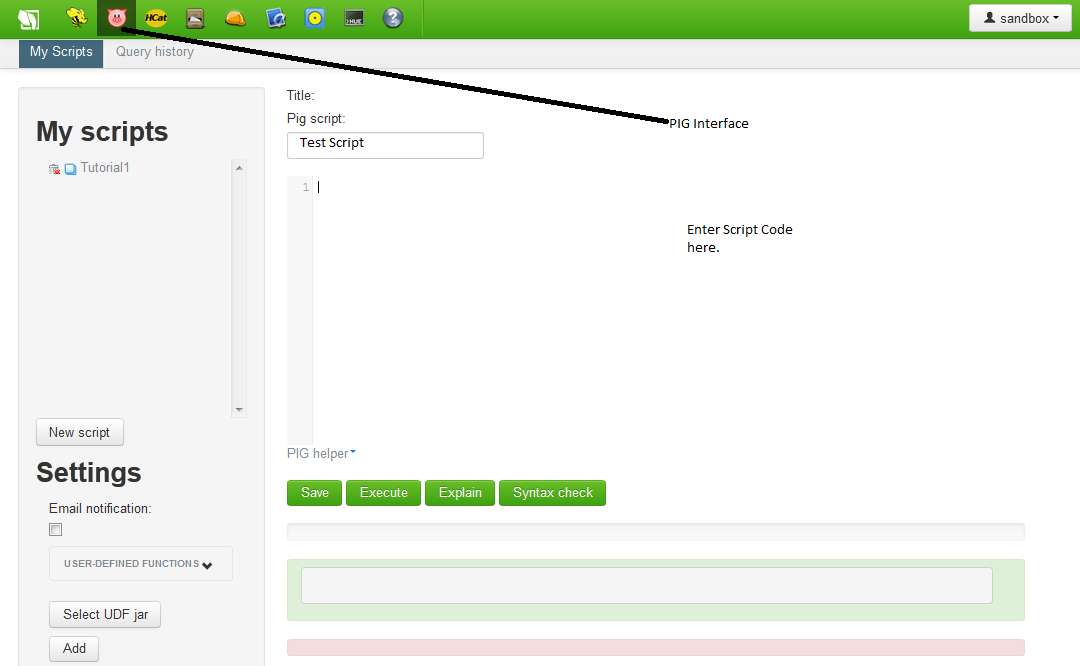
  1.  Login to your Horton Sandbox and on Main screen Click on "Pig" icon. Refer to diagram below
  2.  You can create your first script by entering the Script Name and in the middle of the screen you can see Editor where you should actually code the logic. 
  3.  Enter below script into Editing Area  
  4. A = LOAD 'nyse_stocks_t' USING org.apache.hcatalog.pig.HCatLoader();  // Load the file into a variable A but make a note that the file should be first loaded using File Uploader at  /User/SandBox.
    B = FILTER A BY stock_symbol == 'IBM'; // Filter data for IBM only
    C = GROUP B all;  // Simple Group by function on ALL columns
    D = FOREACH C GENERATE AVG(B.stock_volume);  // Iterate records to calculate Average using AVG function.
    dump D;
  5. Click on "Save" to save this script to sandbox. 
  6. Later you can Open the script and "Execute" to make sure it works fine.  The expected result is
    (7915934.0)
 Hope that helps you get started.

Thanks

Tahir Aziz

Tuesday, August 20, 2013

Getting Started with Hadoop:Loading Data using Hcatalog/Hive


In this tutorial we will get started to load data into Horton Hadoop .We would explain step by step instructions to load data using Hcatalog and will later use Hive and do simple data manipulation on the loaded data using HIVE SQL.
 

Refer to http://tahir-aziz.blogspot.com/2013/07/introduction-to-big-data-and-hadoop.html if you are new to Hadoop and need more basic information.

Loading Data using HIVE


You can load sample data into Hadoop using File Explorer or Hive Directly. Let’s use Hive UI interface to create a table using File as input. For this example we are going to use the sample file available at Hadoop website (Download this file and save at your disk)


Follow below steps to create table from file and load data into target table.
-        

1.       Click on “HCatalog Icon” and Click on “Create a new table from File.  (See Fig below).


2.       Fill the required details enter Table name, Description and chose to upload file which you have saved on your disk.


3.       Click Next and on  next step “Choose Delimiter” Chose the delimiter for this sample file it’s  TAB but other options are also available if your file delimiter is something else e.g. comma , Pipe etc. 

4.       Click Next and on next step “Define Columns” Check the data types by default it treats everything as string you can change the data type to suitable data type as per the column contents. E.g. in our current example file stock_price_high, stock_price_low etc are good candidates to be handled as float so change it. 

5.       Once you are done the process will create table and will also load the table with the file which you have just selected in above steps. 


So what is next now? Let’s check the data content using the HIVE SQL and verify if the contents are loaded properly and all data types are OK. 

Click on Hive UI and you will see an interface where you can enter your query and execute them.
To check if the table has been created and what are the data types you can enter your query as 

describe nyse_stocks_t;

It will display the column names and data type of the columns. 

Now let’s try to do a simple manipulation let’s say we want to calculate the average of Stock volume for IBM. HIVE SQL is similar to standard SQL and supports almost all SQL aggregations. You can write below HIVE SQL to calculate the average. 

select AVG(stock_volume) from nyse_stocks_t
where stock_symbol == 'IBM';

This will return the Average for IBM. 

Hope you learned the basics.

Thanks

Tahir Aziz